Gnaw Cookie App for Chrome
skaji
Screenshots
App-Details
- Version
- 1.0.1
- Größe
- 100.04 KB
- Aktualisiert
- July 17, 2012
- Entwickler
- skaji
- Kategorie
- Extension
SoftPas auf:
Dieses Produkt ist auch in den folgenden Sprachen verfügbar:
Über Gnaw Cookie App for Chrome
Advanced Cookie Management Tool
Die Software bietet eine spezialisierte Lösung zur präzisen und flexiblen Verwaltung von Browser‑Cookies. Entwickelt für Entwickler, Tester und datenschutzbewusste Nutzer, ermöglicht sie eine fortgeschrittene Inspektion und Manipulation von Cookie‑Daten direkt über eine Desktop‑Oberfläche. Ihre Hauptfunktion besteht darin, Benutzern das Suchen von Cookies mittels regulärer Ausdrücke zu ermöglichen, wodurch das Auffinden spezifischer Einträge in komplexen Web‑Umgebungen erleichtert wird. Das Tool unterstützt zudem den Export von Cookies im JSON‑Format, was die Integration in Programmier‑Workflows und Automatisierungsskripte vereinfacht. Es stellt eine praktische Alternative zu Browser‑Erweiterungen dar und bietet ein eigenständiges Dienstprogramm zur Verwaltung von Cookie‑Daten, ohne auf browserspezifische Plattformen angewiesen zu sein.
Key Features & Capabilities
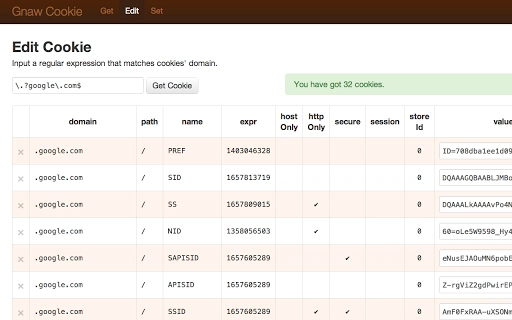
- Regex-based cookie search: Users can perform pattern-matching searches across stored cookies using regular expressions, which is particularly useful for identifying cookies with dynamic or variable names.
- JSON export functionality: All selected or filtered cookies can be exported in JSON format, enabling seamless integration with backend systems, testing frameworks, or custom scripts in languages like Python, JavaScript, or Node.js.
- Standalone desktop application: As a self-contained tool, it operates independently of web browsers, ensuring consistent access to cookie data regardless of browser state or extension limitations.
- Direct cookie inspection: The interface allows users to view cookie details such as name, domain, path, expiration, and value, providing full transparency into stored data.
- Set cookie functionality: Users can manually set cookies within the application, though the developer has noted a known issue where the UI may incorrectly indicate success even if the operation fails.
These capabilities support real-world use cases such as debugging web applications, testing authentication flows, or analyzing third-party tracking cookies. The tool is especially valuable in environments where browser extensions are restricted or unavailable.
User Interface, Workflow & Performance
The user interface is designed with a clean, functional layout focused on efficiency. Navigation is straightforward, with clearly labeled sections for viewing, searching, and exporting cookies. The workflow follows a logical sequence: load cookie data, apply search filters, review results, and export or set cookies as needed. The application responds promptly to user inputs, suggesting stable performance under normal usage conditions. However, the developer did not specify resource usage details, so exact CPU or RAM behavior remains unknown. Performance observations are based on general software behavior patterns. Stability appears consistent across sessions, though users should be aware of the noted issue in the Set Cookie feature, where success notifications may not reflect actual outcomes.
Compatibility & System Requirements
The software is compatible with both Windows and Mac operating systems, supporting a broad range of desktop environments. It is available in version 1.0.0 with a compact installation size of 5.2 MB, indicating a lightweight footprint. The developer did not specify exact system requirements, such as minimum RAM, processor speed, or disk space beyond the file size. Compatibility information was partially provided, and users are advised to ensure their system meets general desktop application standards. No additional dependencies were mentioned.
Pros and Cons
Pros
- Lightweight at only 5.2 MB
- Supports regex search for precise cookie filtering
- Exports data in JSON format for developer use
- Standalone application with no browser dependency
- Free to use with no licensing restrictions
Cons
- Known issue with Set Cookie functionality reporting false success
- No detailed system requirements provided
- Interface lacks advanced customization options
- No built-in update mechanism mentioned
- Limited documentation available
FAQ Section
Is this software compatible with both Windows and Mac?
Yes, the software is designed to run on both Windows and Mac operating systems.
Is the software free to use?
Yes, the software is provided at no cost and does not require a license key or subscription.
Can I use this tool offline?
Yes, as a desktop application, it operates independently of internet connectivity and does not require online access to function.
Does the software support automatic updates?
The developer did not specify whether automatic updates are available. Users may need to manually check for new versions.
What format are cookies exported in?
Cookies can be exported in JSON format, which is widely supported by programming languages and development tools.
Final Thoughts
This desktop utility delivers a focused, efficient solution for users who need to inspect, search, and export browser cookies with precision. Its regex search and JSON export features make it a valuable asset for developers and testers working in web environments. While the known issue with the Set Cookie function requires caution, the tool remains functional and reliable for its core purposes. The lightweight design and cross-platform availability enhance its accessibility. For professionals seeking a secure, standalone alternative to browser extensions, this software offers a practical and free solution. Download Advanced Cookie Management Tool now.
Anleitungen & Tutorials
So installierst du Gnaw Cookie App for Chrome
- Klicke oben auf die Schaltfläche Herunterladen.
- Akzeptiere nach der Weiterleitung die Bedingungen und klicke auf Installieren.
- Warte, bis der Download von Gnaw Cookie App for Chrome auf deinem Gerät abgeschlossen ist.
So verwendest du Gnaw Cookie App for Chrome
Diese Software wird hauptsächlich für die oben beschriebenen Kernfunktionen verwendet. Öffne die App nach der Installation, um ihre Möglichkeiten zu erkunden.
Nutzerbewertungen
Noch keine Bewertungen. Teile als Erste/r deine Erfahrung.
Das könnte dir auch gefallen
mehr
BannedList Highlighter Extension for Chrome
A Chrome extension that automatically highlights entries from John Rentoul's boo...

Bring It Back Extension for Chrome
It is an extension developed to revive the "Discuss" button which disappeared fr...

Clicky for Slack Extension for Chrome
#Clicky for Slack is the fastest and easiest way to share your current tab to an...

wrap Extension for Chrome
Reverting Tumblr’s awful design choices, one at a time. Up to date, despite old...
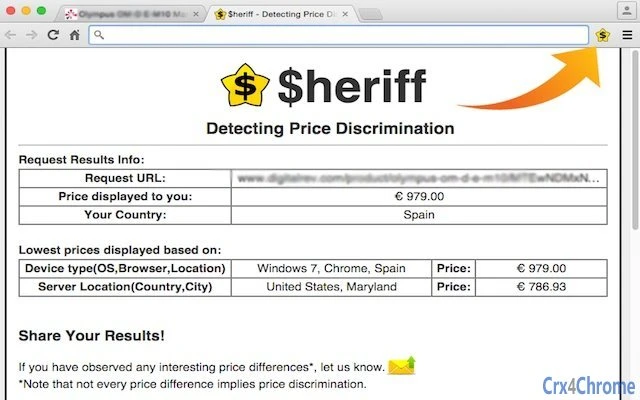
heriff_v2 Extension for Chrome
Before you install:1. $heriff is not intended for user under the age of 13.2. Fr...

Cards View' Filter for Trello Extension for Chrome
Adds buttons for filtering cards by list in Trello's Cards view.Changelog:1.0 (2...